The best rule for messaging your doctor is simple: use secure portal messages for brief, non-urgent requests like refills, clarifications, or scheduling, and call for anything urgent. Keep your message focused on one concern. Remember that portal messages become part of your medical record and are typically read during business hours, not around the clock.
TL;DR:
- Using a clear, direct subject line and including your full name and patient ID ensures faster triage and accurate chart retrieval.
- Keep messages focused on one concern, limit length to one to three sentences, and attach relevant photos only through the secure portal.
- Urgent symptoms such as chest pain, difficulty breathing, or severe allergic reactions require immediate emergency calls instead of portal messaging.
- Most practices review messages during business hours, with responses typically within one to three days, so demanding instant replies delays care.
- All portal messages become part of your permanent medical record and are viewed by multiple staff members, emphasizing the importance of clear, respectful communication.
Table of Contents
- Top dos and don’ts for messaging your doctor
- How to compose an effective message that gets answered
- When not to message: emergencies and urgent problems
- What happens after you hit send
- Privacy and documentation: who actually reads your message
- Tone, phrasing, and digital empathy in your messages
- Red flags and common mistakes that slow down care
- Publisher perspective: building messaging that actually works
- Secure messaging that fits around your schedule
- FAQ
- Sources
Top dos and don’ts for messaging your doctor
A quick checklist helps most patients get faster, clearer responses. Following these basics also respects the time of the care team reading your message.
- Use the secure patient portal, not personal email or text, for anything related to your health.
- Write a clear subject line that states your request, such as “Refill request” or “Question about new prescription.”
- Include your name and patient ID so staff can locate your chart quickly.
- Stick to one concern per message to help the right person triage it correctly.
- Keep your tone polite and brief, and confirm receipt when a reply asks you to.
- Avoid emergencies in the portal. Chest pain, difficulty breathing, or sudden severe symptoms need a call to emergency services, not a message.
- Skip long symptom dumps. A paragraph listing five unrelated issues slows down triage and often leads to a request that you schedule a visit anyway.
- Don’t use slang or text abbreviations. Plain language reads clearly to everyone on the care team, not just your doctor.
- Don’t expect instant replies. Messaging is asynchronous by design, and demanding an immediate answer defeats its purpose.
How to compose an effective message that gets answered
Good structure makes the difference between a one-day turnaround and a message that sits unanswered. The American College of Physicians recommends that practices set clear expectations for appropriate message types, and your structure should make it obvious which type yours is.
- Subject line: Name the request directly, like “Refill: lisinopril” or “Follow-up on lab results from last week.”
- Identifiers: Include your full name, date of birth, and the medication or issue in question.
- Body length: Aim for one to three sentences. State what you need and any relevant detail, nothing more.
- Attachments: Add a photo only when it’s directly relevant, such as a rash or a medication label, and only through the secure portal.
- One concern only: A message about a refill and a separate message about a new symptom triage faster as two messages than one.
A refill template might read: “Requesting a refill for my blood pressure medication, last filled three weeks ago. Pharmacy: [name], phone on file.” A clarification template: “Following up on my visit Tuesday. You mentioned a dose change, can you confirm the new amount?” An appointment template: “I need to move my November 10 appointment to the following week if possible.”
When not to message: emergencies and urgent problems
Some situations call for a phone call or an emergency room, never a portal message. Messaging systems are not monitored around the clock, and waiting for a reply in a true emergency can cost precious time.
- Chest pain, trouble breathing, or signs of stroke require calling emergency services immediately.
- Severe allergic reactions, including swelling of the face or throat, need emergency care right away.
- Heavy bleeding, high fever with confusion, or sudden severe pain should prompt a call to your doctor’s office or urgent care, not a written message.
- Thoughts of self-harm or a mental health crisis require a crisis line or emergency services, not a portal note.
- Any symptom that feels like it can’t wait a day is a sign you need a phone call instead of a message.
According to Cleveland Clinic’s patient messaging guidance, messages are typically reviewed only during standard business hours, commonly Monday through Friday from 8 a.m. to 5 p.m. A message sent Friday evening about a worsening symptom may not be seen until Monday, which is exactly why urgent issues need a different channel.
What happens after you hit send
Most practices follow a general rhythm once your message lands in the system. Staff, not necessarily your doctor personally, often review it first.
The AMA explains that many portals use team-based triage, so a nurse or medical assistant may read your message before it reaches the physician. According to the ONC Playbook on patient engagement, many practices aim to acknowledge messages within one business day, with a fuller reply following in one to three business days depending on complexity. The AAFP recommends that when a message starts requiring a new history, test orders, or a medication change, staff convert it into a scheduled visit rather than handling it entirely through text.
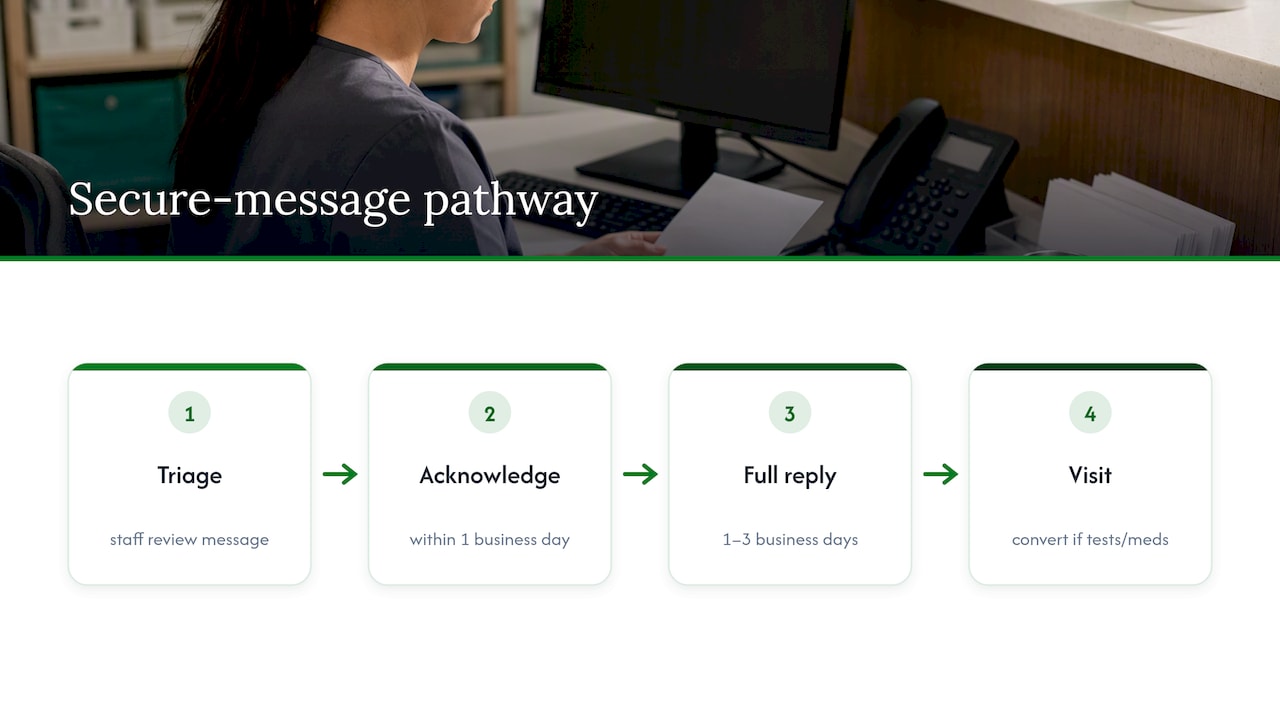
If several business days pass with no response, a polite follow-up message referencing your original note is reasonable. If the issue feels more pressing than it did when you first wrote in, call the office directly instead of sending a second message and waiting again.
Privacy and documentation: who actually reads your message
Every message you send through a patient portal becomes part of your permanent medical record. That record can be reviewed later by other clinicians involved in your care, not just the person you addressed.
- Your message is documented the same way a phone call or visit note would be, which protects both you and your care team if questions arise later.
- Multiple staff members may see it, including nurses, medical assistants, or on-call clinicians, depending on how the practice triages messages.
- Secure portals outperform SMS and email for anything clinical, because standard text and email are not built with the same encryption and access controls.
- The ACP’s guidance on electronic communication favors secure portals over SMS or personal email specifically because of this documentation and security gap.
- Highly sensitive topics, such as a new mental health diagnosis or a result you’d rather discuss by voice, are often better handled in person or by phone, depending on your practice’s own policy.
Tone, phrasing, and digital empathy in your messages
Plain language travels better than clinical jargon or texting shorthand. Write the way you’d explain something to a friend who isn’t in medicine, clear and direct, without abbreviations that could be misread.
Keep each message to one concern, even if you’re frustrated or worried. A calm, specific description (“the rash has spread to my other arm since Tuesday”) gets a faster, more useful response than a message written in frustration. A brief thank-you after a helpful reply costs you nothing and goes a long way with a team handling dozens of messages a day.
The AMA notes that clinicians can show “digital empathy” in asynchronous messages by acknowledging receipt and giving a rough timeline for a full answer, a technique that reduces patient anxiety and cuts down on repeat messages. You can borrow the same idea when you write in.
Pro Tip: If you’re anxious about a result or symptom, open your message with one line of context and a direct request, such as “Please advise if I need to schedule a visit,” so the reader knows exactly what you need from them.

Red flags and common mistakes that slow down care
A handful of habits reliably slow down replies and create confusion. Watching for these saves everyone time.
- Packing multiple unrelated issues into one message forces staff to triage several problems as if they were one, which often means neither gets a clear answer.
- Vague symptom descriptions like “I don’t feel good” give the care team nothing to act on.
- Missing identifiers such as your date of birth or the specific medication name can delay a response while staff track down your chart.
- Sending sensitive results or photos by personal text message instead of the secure portal creates a privacy gap the AAFP’s messaging guidance specifically warns against.
- Demanding an immediate reply ignores how triage actually works and rarely speeds anything up.
The fix is usually simple: send a short, focused follow-up for anything that got lost in the noise, and call the office if the matter has become urgent since your first message.
Publisher perspective: building messaging that actually works
We think most messaging friction comes down to mismatched expectations, not bad intentions on either side. Patients want a quick answer, practices need enough detail to triage safely, and the gap between those two things is where frustration builds.
At Zealthy, we structure messaging around clear consent to telehealth and texting terms of use so patients know exactly what a message will and won’t accomplish before they send one. We’ve also written about the operational steps asynchronous telemedicine requires to work well, because a messaging system only helps patients when the triage and response steps behind it are actually organized. A clear, single-concern message tends to move faster through any system built this way, which is part of why we keep pointing patients back to the basics covered above.
— Bryan
Secure messaging that fits around your schedule
We built our platform around the idea that reaching your care team shouldn’t require guessing whether a message is appropriate or wondering if anyone saw it. Our platform pairs secure messaging with appointments and prescription delivery, so a quick portal note about a refill or a follow-up question connects directly to a provider who can act on it.
- Integrated messaging and visits: send a message and, if your situation needs more than a quick reply, move straight into a same-day appointment.
- Prescription delivery: refills and new prescriptions can reach you without a pharmacy trip once a provider approves them.
- Clear consent and texting terms: our consent to telehealth and texting terms of use spell out exactly how your messages are handled before you send the first one.
- One platform for multiple needs: primary care, weight loss, and other services sit in the same secure system, so your care history stays connected.
If the etiquette above sounds like what you’d want from your own care team, our primary care page is a reasonable place to see how we’ve set it up.
This article is general information, not a substitute for advice from a qualified doctor. Consult a qualified healthcare professional about your own circumstances before acting on anything here.
FAQ
How do you give a compliment to a doctor?
A short, specific message works best: name what helped, such as “Thank you for explaining my results so clearly last visit.” Keep it brief since compliments, like other portal messages, are read by staff and become part of your file.
Why do doctors ask you to say “99”?
This request relates to a physical exam technique for listening to lung sounds through a stethoscope, not to messaging etiquette. Using a repeated phrase creates vibrations that help a clinician detect fluid or abnormalities in the lungs during an in-person exam.
What are the 7 C’s of communication in healthcare?
Definitions vary slightly by source, but a common version includes being clear, concise, concrete, correct, coherent, complete, and courteous. Applying these to a portal message means stating one concern plainly, including the details needed to act on it, and keeping the tone respectful.
What are red flags for a doctor?
In the context of messaging, red flags include symptoms that suggest an emergency, such as chest pain, trouble breathing, or sudden severe pain, none of which belong in a portal message. These situations call for an emergency call or a visit to urgent care instead of waiting for a written reply.
Sources
- MyChart — Message my doctor: Patients tips (Cleveland Clinic)
- American College of Physicians: Ethical Guidance for Electronic Patient-Physician Communication
- Patient Electronic Messaging: 12 Tips to Save Time — AAFP


.svg)
.svg)
.svg)
.svg)

